La Crosse View
- 2.8
- Rating
- 500.00K
- Installs
- Free
- Price

 Analysis by App-foxy
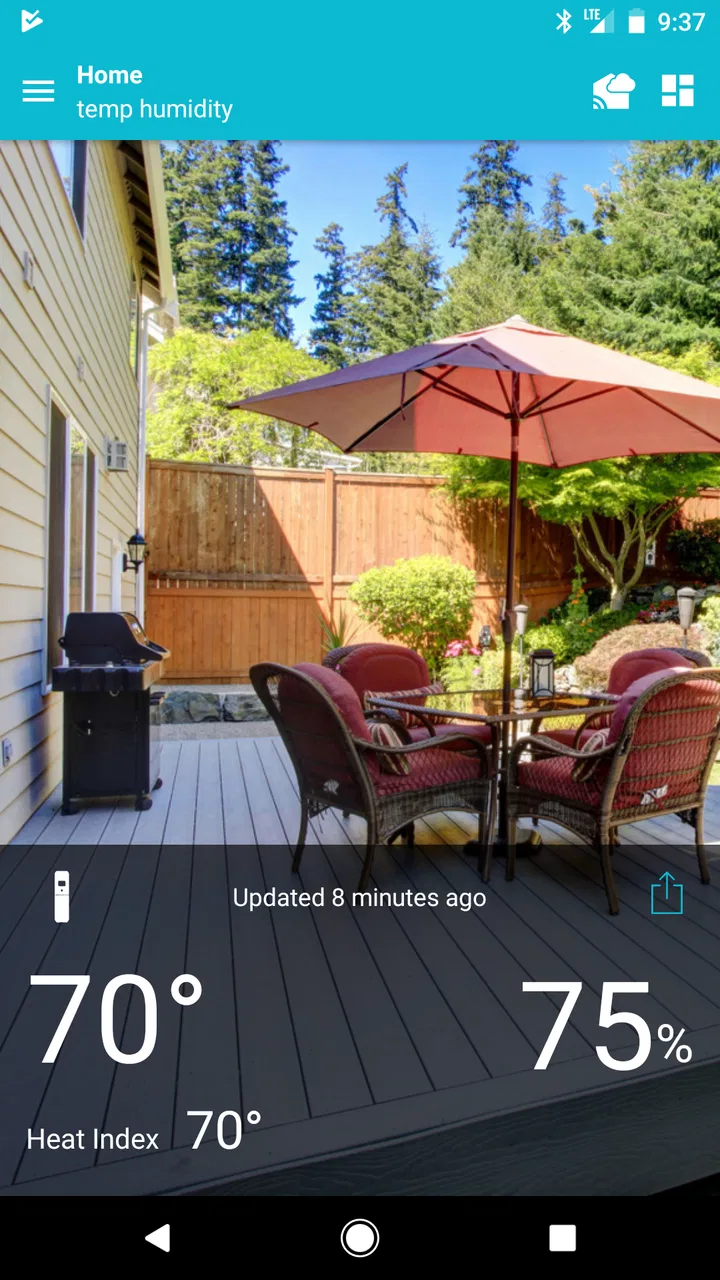
I approached La Crosse View as a companion rather than as another general-purpose weather forecast app. Its job is to connect with La Crosse Technology Wi-Fi Weather Stations and Alert Systems, then make the information from that equipment easier to check on a phone. That distinction matters immediately: if you do not own compatible La Crosse hardware, this is not likely to become your main weather tool.
For someone who already has a station at home, though, the idea is practical. Instead of walking to the display whenever I want to see the indoor temperature, outdoor conditions, or an alert, I can use the phone as the viewing point. The app is free to install, aimed at everyone, and comes from La Crosse Technology. Its usefulness depends less on flashy presentation and more on whether the connection remains dependable when I actually need the information.
How La Crosse View feels in everyday use
The first thing I would tell a friend is to think of this as a remote window into a personal weather setup. It is not simply competing with a standard forecast service that estimates conditions for a whole city. A local station can be more relevant around a house, garden, workshop, or other property where conditions may differ from the nearest official reporting point.
You May Also Like

 Blood Strike: 2.5 Anniversary
Blood Strike’s Loadouts Turn Every Drop Into a Tactical Gamble
A close look at Blood Strike’s custom loadouts: how fast access to signature weapons reshapes its battle royale rhythm, rewards preparation, and narrows the gap between fights.

 Pandora - Music & Podcasts
Pandora’s Music Is Easy to Start, but Harder to Recover
Pandora’s strength is its low-effort path from a seed to a station. Its weak spot is how much confidence it asks you to place in connection, setup, and quiet recovery.

 8 Ball Pool
 Is Built on Rivalries, Rematches, and Routine
A close look at the rivalries, rematches, shared routines, and unanswered safety questions that turn a quick pool match into a persistent mobile community.

 Samsung Music
’s Quiet Strength Is Playing What You Already Own
Its reach comes less from spectacle than from dependable access to a personal library. That simplicity is both the app’s strongest retention engine and its ceiling.

 AccuWeather: Weather Radar
AccuWeather Review: A Quick, Clear Forecast for Everyday Decisions
For everyday plans, the best forecast is the one you can understand quickly. AccuWeather makes rain timing, radar, and local conditions easy to act on, with a few trade-offs.

 Hill Climb Racing
Why Hill Climb Racing Still Turns Crashes Into One More Run
A tiny car, a bumpy hill and one more upgrade: Hill Climb Racing keeps resurfacing because its simple chaos makes every near-miss feel personal.
More From Our News Desk



That local focus creates a different rhythm of use. I might open the app before leaving for work, check the conditions while deciding whether to water plants, or glance at an alert without going to another room. The value is strongest when the station is already installed in a useful location and the phone provides convenient access to its readings.
The experience is less compelling for someone who only wants tomorrow’s forecast, radar, severe-weather headlines, or a broad view of changing conditions. A conventional weather app is usually the better first choice for those needs because it is designed around forecasts rather than around a connected personal station. La Crosse View makes sense when the hardware is the center of the setup.
Speed expectations before relying on it
In a weather companion app, perceived speed is not just about how quickly a screen appears. I also care about how quickly the latest station information becomes understandable, whether the app gets in the way of a quick check, and how much waiting is acceptable when I am looking for an alert. A simple station dashboard should feel more direct than a feature-heavy forecast service.
My expectations would be modest but reasonable. Opening the app should be a short check-in, not a session that requires exploring several unrelated sections. The app’s focused purpose helps here: there is less reason for it to feel overloaded with news, maps, advertisements, or social features. That narrow role can make it feel efficient even when the underlying station connection needs a moment to catch up.
There is an important difference between a slow interface and delayed information from a connected device. If a reading is not current, repeatedly tapping refresh may not solve the real problem. The station, home network, or account connection may be involved. I would avoid treating every delay as an app performance failure and instead look for whether the displayed status makes the situation clear enough to troubleshoot.
A useful habit is to open the app once before leaving rather than waiting until the last second. That gives the station connection time to settle and lets me notice whether the information looks current. For a quick morning routine, this is more dependable than opening it while already rushing out the door and assuming every displayed value is immediately fresh.
What happens during heavier use
Heavy use here is not the same as editing video or playing a demanding game. The pressure comes from repeated checks, multiple alerts, a busy household, or a user who keeps returning to the app throughout the day. A connected weather app can feel perfectly adequate during occasional checks but frustrating when the user expects it to act like a continuously visible control panel.
If I were monitoring changing conditions around a property, I would pay attention to whether repeated openings remain predictable. Does the app return to the station view, or do I need to navigate again? Does an alert lead me to the relevant information, or do I have to search for context? These details affect confidence more than decorative design.
The app is also likely to be used in short bursts rather than long sessions. That is a strength because it does not need to justify extended screen time. The trade-off is that every small interruption becomes noticeable: a reconnect, a delayed update, or an unclear state can turn a five-second check into a troubleshooting task.
One non-obvious way to use it is as a decision aid rather than a source of constant entertainment. I would check it at fixed moments tied to real routines: before opening windows, before starting outdoor work, after receiving an alert, and before leaving a pet or plant-sensitive area unattended. This reduces needless checking and makes the local readings more useful.
Reliability matters more than visual polish
For this kind of app, reliability means more than avoiding crashes. I want the connection to my station to be understandable, alerts to be meaningful, and the app to recover gracefully when the phone or home network has been away from the setup. A weather station companion earns trust when I can tell whether the information is current and what to do when it is not.
I would not use any connected weather app as my only source for serious safety decisions. A personal station is valuable for local awareness, but official emergency notifications and established weather services remain important when severe conditions are possible. That is not a criticism unique to this product; it is a sensible boundary for any home sensor system.
The best workflow is to treat the app as one layer in a small information system. The station supplies local observations, the phone provides access, and another trusted source can provide broader forecasts or warnings. When those roles are kept separate, the app does not have to do a job it was not designed to do.
Recovery is another practical concern. If the app seems out of date, I would first check whether the phone has a working connection, then confirm that the station itself is powered and connected. Closing and reopening the app can be a reasonable next step, but repeatedly reinstalling it should not be the first reaction. Connected products often fail at the link between components, so a calm sequence of checks saves time.
This is especially important for households where one person installed the station and someone else uses the phone. I would make sure the regular user knows which readings are expected, where alerts appear, and what a stale reading looks like. That small bit of preparation prevents the app from being blamed for every unusual value or connection interruption.
Device age and practical constraints
The current version is 2.1.17-38543088, and the app supports Android starting with version 6.0. That gives it a broad compatibility range for Android users, including people who keep an older phone for household equipment. Still, compatibility on paper does not guarantee that every older device will feel equally comfortable in daily use.
On an older phone, I would value a focused interface and restrained background activity. A station companion should not need the same resources as a modern mapping or video app. The more important question is whether the device can maintain the connection and present alerts reliably while the app is not constantly open. I would test that in the actual room and network where the phone will be used rather than judging only from the installation screen.
There is also a practical device-choice question. A phone kept in a kitchen or office may be convenient for quick checks, while a phone carried everywhere is better for alerts away from home. The app’s role changes depending on that choice. A dedicated household screen can make local readings more visible, but a personal phone is more useful when I need information while moving around.
Resource demands should be judged by the complete setup, not just the application icon. The station, Wi-Fi connection, phone operating system, and notification behavior all influence the experience. If battery life becomes a concern, I would avoid leaving the screen open continuously and use the app for deliberate checks. That preserves the advantage of remote access without turning the phone into a permanent display.
People using iOS should also think about the same practical questions: whether their particular La Crosse equipment is supported, whether notifications are configured as expected, and whether the phone is the right place for continuous monitoring. The app is available as a mobile companion, but the station remains the essential part of the experience.
Who will get the most from it?
The clearest audience is a La Crosse Technology station owner who wants readings available away from the physical display. Gardeners can use local conditions when planning routine outdoor work. Homeowners may appreciate checking the environment around the property from another room. Someone managing an alert system may prefer having the phone involved instead of relying on a single display that is easy to overlook.
It can also help people who care about differences between their property and a citywide forecast. A nearby official station may not reflect a shaded yard, an exposed balcony, or a particular part of a building. Personal equipment is not automatically perfect, but it can answer a more personal question: what is happening at my location?
I would skip it if I do not own compatible La Crosse hardware. Installing it just to browse ordinary weather information would miss the point and could lead to disappointment. I would also look elsewhere if my priority is detailed forecasting, animated radar, long-range planning, or a rich map experience. A standard weather service is more suitable for those tasks.
It may not be the best fit for a user who dislikes troubleshooting connected devices. The app’s usefulness is tied to a chain of equipment and network conditions, so there is more to maintain than with a standalone forecast app. That extra dependency is justified only when local station data is worth the effort.
Cost, expectations, and the ownership decision
The app itself is free, with optional in-app purchases listed from $1.99 to $29.99 per item. I would separate that cost question from the value of the station hardware. The application is an access point to a broader setup, so the right decision is not simply whether a free download looks attractive. It is whether the connected station and its phone access solve a problem I actually have.
Because the app has an average rating of 2.8 from around 15 thousand ratings and roughly 7.6 thousand written reviews, I would approach it with realistic expectations rather than assuming a flawless experience. Those figures do not tell me which specific hardware combinations or network situations caused dissatisfaction, but they do suggest that reliability and setup experience deserve attention before I depend on it.
The install base is over 500 thousand, so this is not an obscure experiment with no real audience. At the same time, popularity does not remove the need to confirm compatibility with the exact station or alert system I own. The companion relationship is the central issue, and a good result depends on matching the app to the equipment rather than judging it in isolation.
For an everyday household, I would start with a simple test period. Check the station from the usual rooms, observe how alerts fit into the day, and try the app after the phone has been away from the home network. That reveals more than a single successful opening. It also shows whether the app saves time or merely adds another screen to maintain.
Comparison with ordinary weather apps
Compared with a typical weather app, La Crosse View is narrower but potentially more personal. A forecast app is usually better at explaining what may happen across a wider area. It may offer a richer visual forecast, location search, and broader context. This app’s advantage is the connection to a physical La Crosse setup that can report conditions where the station is installed.
That makes the comparison less about choosing a universal winner and more about choosing the correct layer. If I am planning a road trip, I want the broader forecast tool. If I am deciding whether conditions around my own house have changed, the station companion can be more relevant. Many users will sensibly keep both, using one for local observation and the other for prediction and regional context.
The trade-off is convenience versus dependence. Ordinary weather apps work without a personal station, while this one is more meaningful once the hardware is in place. The station can provide a closer view, but the phone experience may involve connection checks that a basic forecast app avoids. I would choose the companion only when that local detail has a clear purpose.
My performance verdict
After looking at the app through the lens of speed, repeated use, reliability, device age, and recovery, I see La Crosse View as a specialized utility with a sensible purpose but limited appeal outside its ecosystem. Its strongest quality is not the promise of replacing every weather service. It is the ability to bring a compatible La Crosse station’s information into a more convenient daily routine.
I would recommend it to an existing La Crosse Technology user who wants remote access and is willing to give the connected setup a little attention. I would not recommend it as a first weather download for someone without the hardware, nor as a replacement for official warnings or a full forecasting service.
The most useful approach is to keep expectations grounded: open it for local readings, use alerts as an additional layer of awareness, and verify important conditions through trusted broader sources. If the connection remains stable on the devices and network you actually use, the app can make a home weather station feel much more practical. If your needs are mainly forecasts and maps, a conventional weather app will probably feel faster, simpler, and more complete.
La Crosse Technology released this weather companion on August 25, 2017, and its continued presence makes sense because the underlying need has not changed: people want to check conditions around their own homes without standing beside a display. My final view is cautiously positive for the right owner. The app is worth considering when local station access is the goal, not when general weather information is all you need.
FAQs for La Crosse View
01What is La Crosse View and what does it do?
La Crosse View is a smart app designed to work with La Crosse Technology’s range of weather stations. It allows users to monitor real-time weather data, receive alerts, and customize notifications. The app integrates with home weather systems to provide detailed insights into temperature, humidity, wind, and more, directly on your smartphone.
02Is La Crosse View compatible with all weather stations?
La Crosse View is specifically compatible with La Crosse Technology’s Wi-Fi enabled weather stations. Before downloading the app, ensure your weather station is compatible by checking the product specifications or consulting the manufacturer's website. Incompatibility may limit functionality or prevent the app from connecting to your device.
03How user-friendly is the La Crosse View app for beginners?
The La Crosse View app is designed with user-friendliness in mind, featuring an intuitive interface that simplifies navigation. Beginners can easily set up and customize their weather monitoring preferences. The app provides clear instructions and support, making it accessible for users with varying levels of tech proficiency.
04Does the La Crosse View app require a subscription or any additional fees?
La Crosse View is free to download and use. However, some advanced features and functionalities may require in-app purchases or subscriptions. It's important to review the app's pricing details in the app store to understand any potential costs associated with premium features or services.
05What kind of data privacy measures does La Crosse View implement?
La Crosse View prioritizes user data privacy by implementing robust security measures. The app requires minimal personal information and ensures data is encrypted during transmission. Users should review the app’s privacy policy for detailed information on data handling practices and to understand how their information is protected.
Pros
- User-friendly interface for easy navigation.
- Real-time weather updates are accurate.
- Customizable alerts for weather changes.
- Syncs effortlessly with compatible devices.
- Offers historical weather data access.
Cons
- Limited features in the free version.
- Requires strong internet for updates.
- Occasional syncing issues reported.
- Battery usage can be high on some devices.
- Ads can be intrusive in the free app.

La Crosse View
Gallery